
A Step-by-Step Guide -How to start a blog in 2026
Do you want to embark on your blogging journey in 2026? Blogging has transformed from a personal hobby into a full-fledged platform for passionate individuals, professionals, and businesses to boost their online presence and access lucrative opportunities. How to start a blog in 2026 is a common question among beginners, and the best part is that you can easily launch your blog and share your thoughts with the world in just a few steps. This would also open multiple revenue streams if you’ve done it correctly.
So, what are you waiting for? Today, we’ll walk you through a step-by-step guide on how to start a blog in just 20 minutes. You no longer need to feel stressed or anxious about blogging. This guide will teach you how to become a creative blogger with basic computer skills and an optimistic mindset.
Let’s Get Started!
What is a Blog?
A blog can be a full-fledged website or a section of a website where you publish informative content daily. The platform gives you the flexibility to share your ideas or content about a topic you want to convey. That content should speak directly to the targeted online audience – be it buyers, consumers, or curious readers.
Starting a blog requires an amalgamation of written and visual elements to create an engaging, visually appealing, and easy-to-read page to attract potential visitors. The best part is that you can easily find blogs about every topic on the internet. Creative writers, scholars, researchers, and even businesses use this powerful platform to share their views and encourage others as well. It can also help you make money by optimizing it for search engine platforms and driving organic traffic.
Step-By-Step Guide on How to Start a Blog in 2026
Step 1: Be Wise and Choose a Blog Name
First things first! You’ll need to pick a domain name for your blog. It defines the category of your blog. A domain name is basically the web address for your blog. For instance, myhealthblog.com.
You can also check your choice of domain name using the domain name search to ensure its availability. If someone else has already registered your choice of name, you need to choose another or consider the following tips on finding a blog name that has already been taken by someone:
- Find a different domain extension: If the .com is not available, you can get the .org or .net version of the same domain name.
- Tweak a domain name: You can add words like “in”, “my”, “a”, etc., to make it available.
- Adding dashes (-) in between a domain name
Note: Not allowed to use any spaces or punctuation, other than dashes, in a domain name. You also can’t use capital words.
How to Pick the Most Suitable Blog Topic and Name
If you are embarking on your blog journey for the first time and don’t know what to blog about, consider the following options to find a good blog topic to gain maximum visibility:
Share Life Experiences: Everyone has life experiences, and they can share their life lessons and knowledge in the blog to help create awareness in different situations. For example, if you are a working woman, you can create a blog and share tips and tricks to help women juggle work and personal life without compromising on their health.
A personal blog: Under this, you can share everything and diverse topics related to you. This is one of the great ways to share your views with the world.
Informative and passionate blogs: Do you have hobbies? Are you a passionate professional? Share your experiences. You can start a cooking blog, travel blog, cleaning blog, etc.
Once you have selected a topic, choose the most descriptive blog name to attract potential readers and visitors. If you are blogging about a particular topic, choose the respective domain name. For example, if you are starting a cleaning blog, you can choose work cleaning hacks, DIY cleaning, cleaningpro, etc.
Step 2: Launch Your Blog Like a Pro
Now you have got a blog name, the next step is all about getting it online. Make sure you get the following things:
Domain Registration: You need to claim your domain name for your blog by registering it. These are the first steps you’ll need to take when launching a blog.
Blog Hosting: Every blogger needs a reliable platform to store all of their blog-related files and directly deliver them to the visitor when they search for their blog name. So, you must have a blog hosting to launch your blog online.
Content Management System: You need a platform to showcase your blog content in a well-structured format to engage visitors. You can use WordPress because it is one of the easiest CMS platforms that can help you create, build, edit, and customise blog content without writing a single piece of code.
The best part is that you can access all in a compiled package from BlueHost. It is one of the best platforms for all new bloggers because:
- They will help you register your custom domain name for free.
- They will offer free WordPress installation
- Also, access to reliable hosting
Step 3: Customize Your Blog For a Personal Touch
From the WordPress admin dashboard, you can create and edit your blog site. Once you log in, you can easily customize your blog the way you want.
You can choose Themes from WordPress blog layouts to customize the design of your blog. The best part is that you can change your theme by clicking on the “Appearance” tab on the left menu.
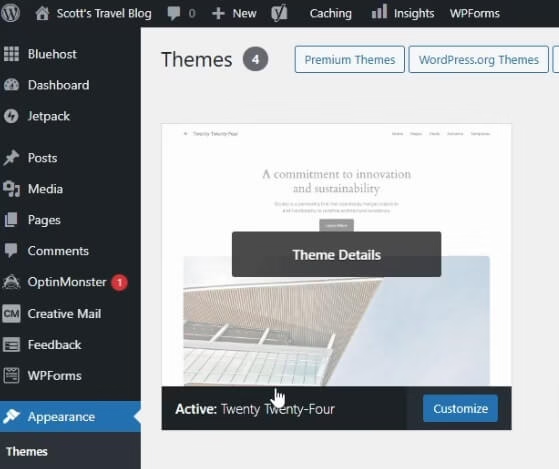
You can find various pre-installed free themes based on different categories to help you enhance the look and feel of your blog.
These are beautifully designed, clean, and engaging that can work for any blog type. To activate the theme, click the “Active” button. Hurray! You have successfully changed the entire design of your blog in a few clicks.
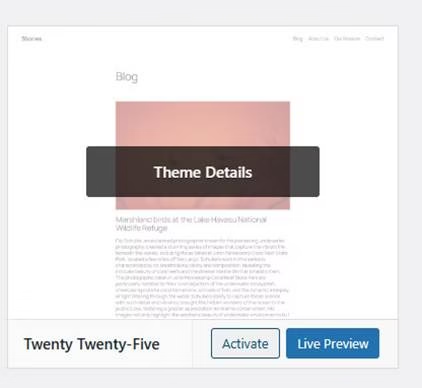
If you don’t find your choice of theme from the library, you can choose from thousands of other free WordPress themes. All you need to do is click on the “Appearance” tab on the left menu and click “Add New Theme.”
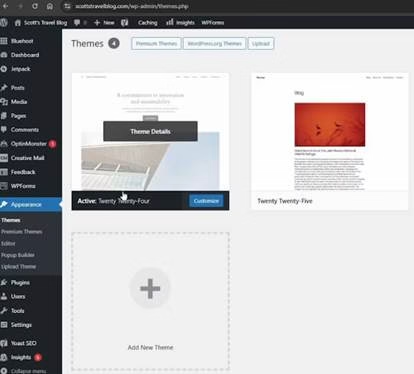
Now you can access the WordPress theme search screen, where you can find thousands of themes. You can activate a new theme to design your blog. Click on the “Popular” tab and browse different designs and layouts of themes. You can easily install your choice of theme with just a click.
Activate the theme and explore other customization options to create a personalized blog.
Step 4: Write a New Blog Post and Publish It Online
Blogging gives you the platform to find your voice and share your views with potential readers. Once you’ve customized your blog and it is running online. Create your first blog post.
You just need to click on “Posts” from the left menu:
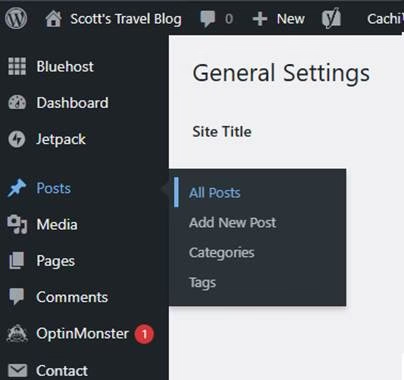
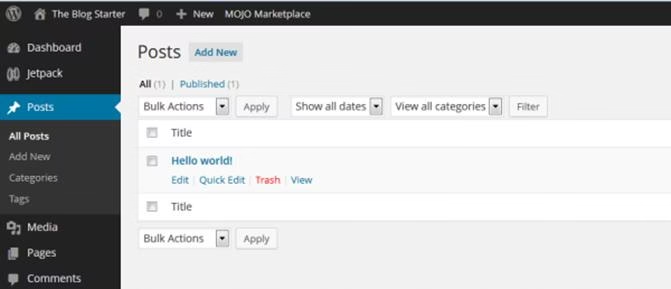
You’ll see a default post on every new WordPress blog, and you don’t need it. Make sure you delete it by clicking “Trash” under the post.
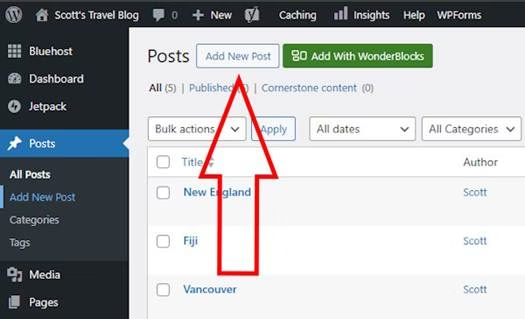
Next, click on the “Add New Post’ link to write a new post:
Now you can access the post editor screen. Ensure you enter the title of your desired post in the box and start writing and sharing your content in the lower box. You can also add images to your post. Click on the +icon and click the image. Then upload a picture from your device.
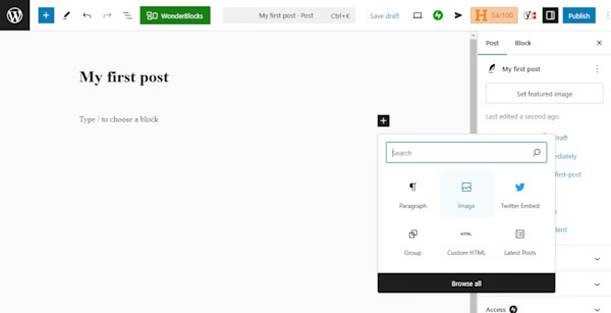
When you are done with your writing skills, click the “Publish” button on the top right side, and here you go.
What are the Types of Content You Should Provide in Your Blog?
There are two different types of content you can add to your blog:
Static Content:
These include a few essential pages designed to provide a reader with the tools they need. Static means the content you don’t change. This usually includes the About Us page, which unveils the details about you as a blogger, your personal achievements, and your vision. Adding a contact us page also helps the audience to reach you. This builds a sense of trust, and they will visit your blog regularly.
Adding a disclaimer page is necessary if you have a medical or health-related blog. If you want to monetize your blog, you must unveil the ways to generate income. A privacy policy is also essential if your intent is to collect data from your visitors.
The terms and conditions page is important if you run a store for selling services. These pages are often linked to in the footer menu of your blog.
Dynamic Content:
It is the content that reflects your brand and offerings on the web. It could be anything, ranging from informative tips to facts, stories to opinions. This will help your audience engage, boosting your organic traffic.
Step 5: Promote Your Blog For a Wider Reach
Blogging is more than content creation. Once you’ve published your blog post, you will need to gain visibility to attract the right audience. You will need to promote it across digital channels. Here are a few things you can do:
Promote your Blog within your Circle
People close to you, such as family, friends, and colleagues, are the ones who can become your followers. Share the link of your blog with them or ask them to promote your new blog on their social media platforms.
Social Media Promotion
This is one of the most effective ways for blog promotion. Use the power of Facebook, Instagram, X, and LinkedIn to promote your new blog. Create an engaging description and share it from your personal account. Adding a link to your blog makes it easy for followers to reach your site.
Commenting on Other Blogs
Find other blogs in the same community and engage with them. You must leave a comment to engage the web audience.
Collaboration:
You must collaborate with social media influencers and like-minded people to promote authenticity. Collaborating also includes guest posting, promoting each other’s products and blog posts, and gaining a targeted audience.
Note: Post regularly to keep your blog active and curious to potential readers.
How to Optimize Your Blog for Search Engines?
Do you want to drive organic traffic to boost your search engine rankings on Google and other platforms? Then, you’ll need to optimise your blog for SEO. Here’s how you can do:
Google: Make sure you sign up for a Google Webmaster account and open the Search Console. To add your blog, simply click “Add Property” and follow the given steps.
Bing: You can easily sign up for a Big Webmaster account to add your blog
Make sure you optimize each page for SEO:
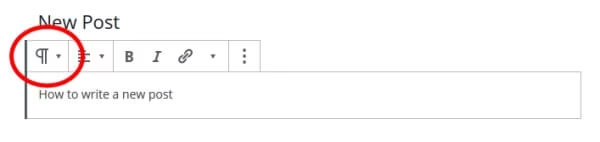
Header Tags: These include headings and subheadings. Click on the left side of the block you are writing in and change it to Heading. You can choose from H1, H2, and H3 to structure your content piece.
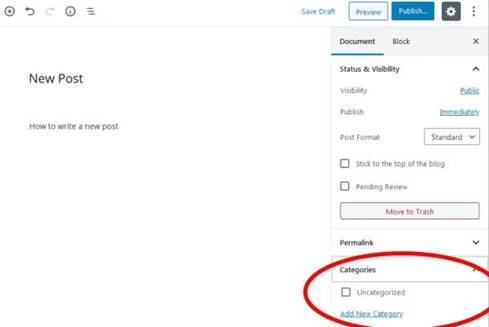
Categorization: You must categorize your blog post into a relevant category. You can do this by clicking on “Document” on the right menu, and clicking down on “ Categories” and “Add New Category.”
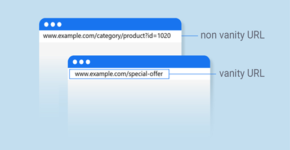
Permalinks: Each blog has a slug- the URL-friendly version of the title, appearing at the end of the URL. Make sure you customize it to a defined slug. Do not add an article number. You can change this in your WP dashboard by doing this
Settings > Permalinks > Select the “Post Name” and click > Save Changes
You must also install the Yoast WordPress plugin to optimize your blog for search engine pages and gain organic traffic.
Step 6: Monetize Your Blog
Once you have gained and retained a web audience or visitors, you must monetize your blog to earn income. Blogs, these days, are highly lucrative, but it requires a lot of work and patience. It could take seven to twelve months to start seeding a steady stream of revenue. Here are some great monetizing tips for bloggers:
Selling Advertising Space
Popular bloggers can place the Google AdSense code on their blogs to run ads. Advertisers are always in search of high-traffic blogs for promotions. Google AdSense is the best way to start. It takes all the hard work.
Selling Affiliate Products:
This is a commission-based program to earn money. When your reader clicks on a link on your blog, they will be navigated to an advertiser’s page, and you earn a commission if they make a purchase. You can write product reviews or mention products in your blogs.
Selling Products and Services:
You can also sell your own products and services through your blog to generate income. You can use a sidebar to boost the visibility of your products using visual images, as well as add a link to your storefront page.
Sell Membership
You can create membership programs to access exclusive content. It will be offered to paid members. However, for that, you’ll need to create a high-quality, authentic, and informative blog.
Conclusion
Get the ball rolling with the help of this guide. You can follow this simple step guide on how to start a blog in 2026 to share your thoughts, sell your products, and monetize your creation. Nothing is impossible when you know the right path to success.





About Author

Pooja
I am a seasoned Senior Content Writer and Manager with over a decade of experience in the IT sector. Known for her creativity and professionalism, she excels in crafting engaging, SEO-friendly content that drives results. Her affiliation with WebNextReview is a matter of great pride for us, as she continues to contribute valuable insights and impactful narratives to our platform. She is Available on linkedin.